| android | ||
| crates | ||
| docs | ||
| web | ||
| .containerignore | 35 B | |
| .gitignore | 52 B | |
| .hearthforge-ci.toml | 4.8 KB | |
| Cargo.lock | 76.7 KB | |
| Cargo.toml | 316 B | |
| compose.yaml | 589 B | |
| Containerfile | 1.1 KB | |
| README.md | 3.5 KB |
opentracker
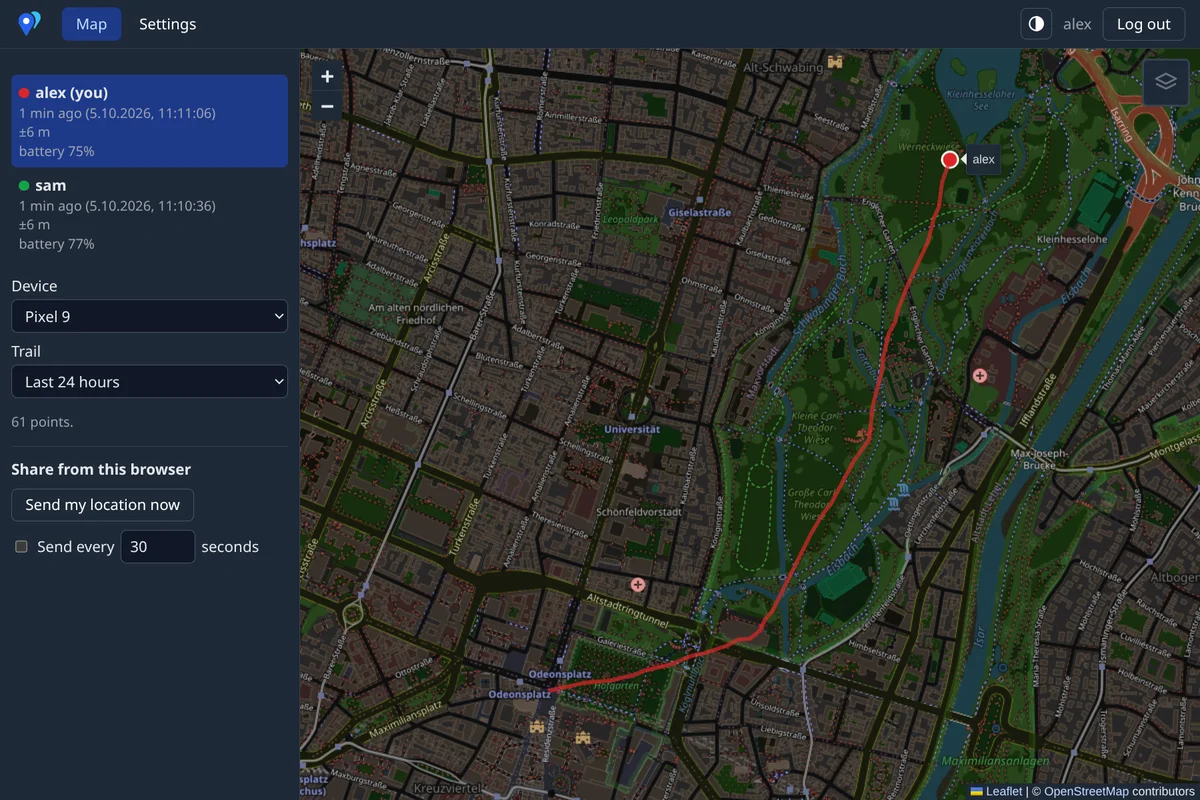
Self-hosted location sharing. Devices upload positions over HTTPS. A web map shows your position and the positions others share with you.
crates/api     JSON types shared by server and web
crates/server  otserver: axum + SQLite, serves the API and web/dist
web/           Leptos + Leaflet, built with Trunk
android/       Android app: background tracking, this device's map, see android/README.md
Deployment
Set OT_PUBLIC_URL in compose.yaml to your address. Then start the server:
docker compose up -d
The container listens on 127.0.0.1:8080. Put a TLS reverse proxy in front of it. A proxy with HTTP/3 is recommended, because phones reconnect faster after sleep. The Android app uses HTTP/3 from Android 14. Caddy does HTTP/3 by default:
track.example.com {
	encode zstd gzip
	reverse_proxy 127.0.0.1:8080
}
HTTP/3 needs UDP 443 open next to TCP 443.
Open the address and create the admin account. The first visitor gets this account, so do it before you expose the server.
The server updates the database schema at start. Back up the database file before you upgrade.
Reverse proxy
--public-urlis the address that browsers use. Passkeys are bound to it. Anhttps://URL also marks the session cookieSecure.--trusted-proxymakes the sign-in rate limits use the client address from the proxy'sX-Forwarded-Forheader. Only turn it on when clients cannot reach the server port directly. Otherwise they can fake the header.
compose.yaml sets both.
Configuration
Every flag can also be set by its environment variable. otserver --help lists them.
| Flag | Variable | Default | |
|---|---|---|---|
--addr |
OT_ADDR |
127.0.0.1:8080 |
listen address |
--db |
OT_DB |
ot.db |
SQLite file |
--web-dir |
OT_WEB_DIR |
web/dist |
built web UI |
--public-url |
OT_PUBLIC_URL |
the address browsers use, see Reverse proxy | |
--retention-days |
OT_RETENTION_DAYS |
30 |
days to keep points, 0 keeps them forever. Users can choose a shorter time. |
--trusted-proxy |
OT_TRUSTED_PROXY |
off | trust X-Forwarded-For, see Reverse proxy |
otserver passwd <user> creates a user or resets a password. A reset also removes the user's passkeys and device tokens.
Usage
- Admins manage users under Settings → Users.
- Each user can sign in with a password, a passkey, or both (two-factor). Choose this under Settings → Security.
- Devices sign in with a token. The Android app gets one through the browser. For other clients, create one under Settings → Devices.
- A person can upload from several devices. The map shows one dot per person, at the newest position.
- A share with another user chooses which devices, how much history and how exact the position is.
- A guest link shares with anyone who has the link, optionally with a password.
Development
cd web && trunk build && cd ..     # or `trunk serve`: live reload on :8081, API proxied to :8080
cargo run -p server                # http://localhost:8080
Send a point as a device:
URL=http://localhost:8080 TOKEN=...   # a token from Settings → Devices
curl -H "Authorization: Bearer $TOKEN" --json "[{\"ts\":$(date +%s),\"lat\":48.137,\"lon\":11.575}]" $URL/api/points
Android app
See android/README.md.
Languages
The web UI and the app are in English and German. Web texts live in web/src/i18n.rs. App texts live in android/app/src/main/res/values*/strings.xml.